You will confront an attempted exploitation of a newly discovered and unpatched vulnerability (CVE-2024-XXXX) in a critical software component within your organization’s infrastructure. The CVE allows for remote code execution, posing a significant threat if successfully exploited. At 12:05 PM UTC, an alert is generated by the Intrusion Detection System (IDS) and Intrusion Prevention System (IPS), indicating an attack on one of your web servers. Your task is to analyze the provided artifacts, confirm the exploitation attempt, and answer the provided questions.
First, transfer the files to our sandbox environment and explore the types of files we can analyze.

- Apache24: A widely used web server software, often bundled with modern setups to serve HTTP requests. “Apache24” typically refers to version 2.4, known for its performance, flexibility, and support for modules.
- PHP: A server-side scripting language designed for web development, enabling dynamic content generation and interaction with databases. It’s frequently used with Apache for building dynamic websites.
- Prefetch Logs: Windows system files (
*.pf) that record application execution metadata to optimize program startup and assist in forensic analysis of recently executed applications.
What version of PHP was running on the server during the incident?
To determine the PHP version, check the snapshot.txt file located in the PHP folder.

snapshot.txt in PHP logs is a file that provides details about the PHP build, including the version, build date, and configuration settings. It’s often used to verify the installed PHP version and environment details.

When PHP is configured to run as CGI, which directive in httpd.conf specifies the scripts that handle requests for PHP files?
When PHP is configured to run as CGI, the Action directive in httpd.conf specifies the script handler for PHP files.
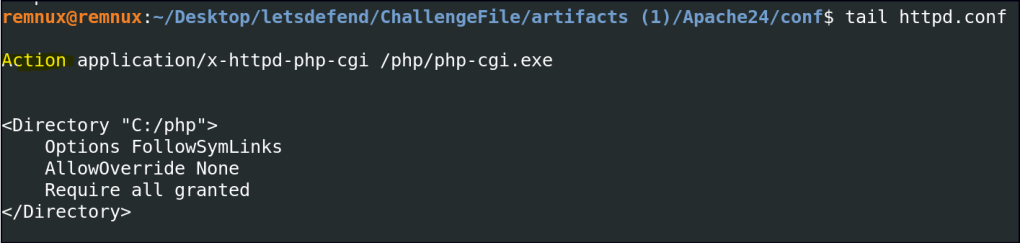
What is the IP address of the attacker who attempted to exploit our server?
Let’s analyze the Apache server’s access logs to gather more information. These logs record client requests, including IP addresses, requested URLs, HTTP methods, and response codes, providing insights into server activity.


Since we know the CVE, let’s research it to understand exploitation techniques and payloads.
CVE-2024-4577 Exploits in the Wild One Day After Disclosure

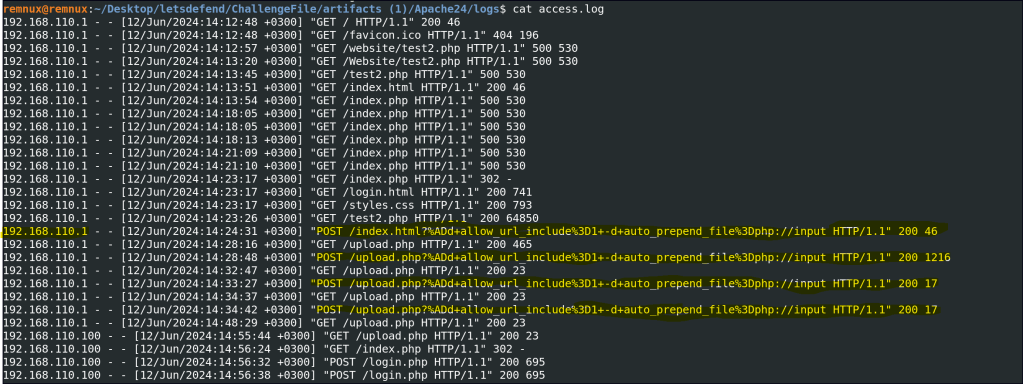
The attacker targeted a specific page on the server with malicious payloads. Which page did the attacker target with malicious payloads?

What version of Apache is running on the server?
Error Logs: If Apache is configured to log version information, it may be present in the error logs.

The attacker managed to execute commands on the server. What was the first process initiated by the attacker’s commands during their successful attempt?
Correlate Apache access log timestamps with prefetch log times to identify executed commands.
First, list the prefetch logs by the latest timestamp using the following command:
ls -lt --time-style=full-iso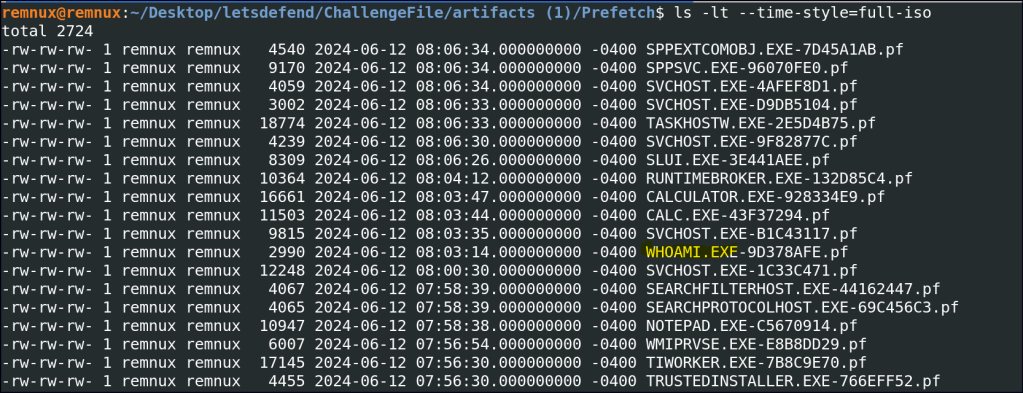
I couldn’t correlate the access logs and prefetch logs by date, but I found whoami.exe, a common tool used by intruders to check the accessed user. This is often a step taken after gaining access.
Before the attacker was detected and blocked, they executed another command, launching a new process. What process was launched by this command?
I also noticed calc.exe trying to mimic calculator.exe to avoid detection, which is suspicious and suggests a potential persistence technique.

What is the CVE number of the exploit used by the attacker?
CVE-2024-4577
 Persecure : my learning archive